


Favorite Folder AND Sub-folders?
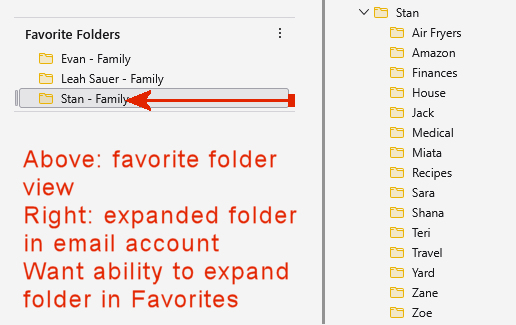
I have a few favorite folders. One of them has sub-folders. Is there a way to favorite a folder and have the sub-folders be available at the same time? I don't want to favorite each sub-folder separately because the context would be lost. What I'm asking is there a way to show the "expand" option of favorite folder?
Ñemoĩporã poravopyre
SewHelpMe said
... is there a way to show the "expand" option of favorite folder?
There is not.
You may suggest it at https://connect.mozilla.org/t5/ideas/idb-p/ideas/label-name/thunderbird. Please state your exact requirements.
Emoñe’ẽ ko mbohavái ejeregua reheve 👍 0Opaite Mbohovái (4)
Ñemoĩporã poravopyre
SewHelpMe said
... is there a way to show the "expand" option of favorite folder?
There is not.
You may suggest it at https://connect.mozilla.org/t5/ideas/idb-p/ideas/label-name/thunderbird. Please state your exact requirements.

After I select a folder as favorite, I have no way of seeing what folders are my favorite. So how do I tell that? I have 64 bit version of Thunderbird version 140.0.1.
I know in Outlook has favorite folder and tell that way but not in Thunderbird. I would like to see a similar folder.
Phil said
After I select a folder as favorite, I have no way of seeing what folders are my favorite. So how do I tell that? I have 64 bit version of Thunderbird version 140.0.1. I know in Outlook has favorite folder and tell that way but not in Thunderbird. I would like to see a similar folder.
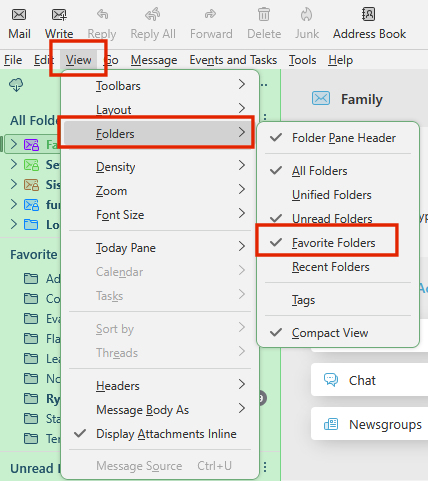
To display favorited folders in Thunderbird, you need to first mark the desired folders as "Favorites" and then select the "Favorite" view in the Folder Pane. To do this, right-click on a folder and choose "Favorite Folder". Then, navigate to View > Folders > Favorite or use the Folder Pane Toolbar to switch to the "Favorite" view
You may need to first enable menu bar: To display the menu bar in Thunderbird, you can either temporarily show it by pressing the Alt or F10 key, or permanently enable it by right-clicking an empty space on the tab strip and selecting Menu Bar
That is awesome. It works perfectly. Many thanks.