Address book; deleting
I'm using TB 144.0.1 on a Mac desktop. When I open my address book, several come up. "Personal Address Book" is the default, which is fine by me; I can add, subtract as I wish. There are two others, "Collected Addresses" and "Mac OS X Address Book." The latter is obsolete with numerous bad addresses in it, but even though clicking the ellipses brings a speed menu containing "Delete," selecting it and confirming my desire to delete the address book has no effect. Why have a command purportedly available that doesn't work? My Mac mini uses MacOS Tahoe 26.1, and the obsolete "Mac OS X Address Book" serves only to misdirect my outgoing mail. How can I delete it?
All Replies (1)

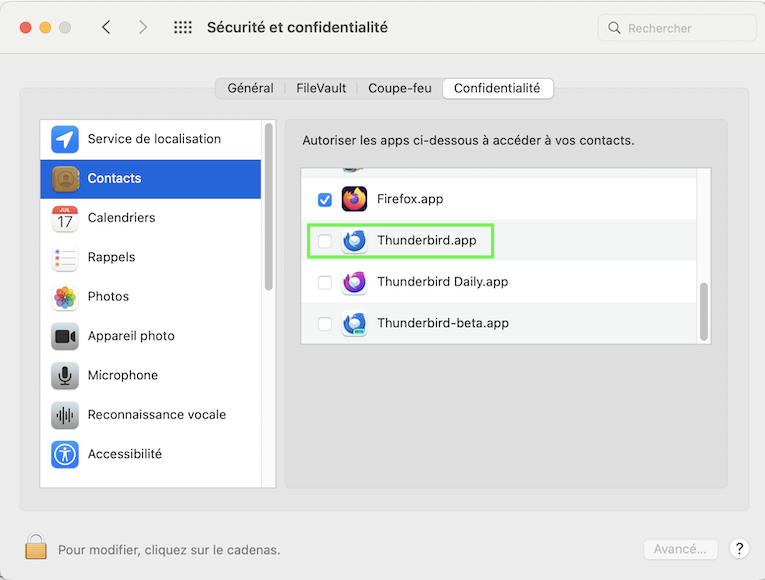
The "Mac OS X Address Book" in Thunderbird's Address Book is the equivalent of the macOS "Contacts.app". It is "read-only", so you can't carry out any modifications such as deleting a contact. Quit Thunderbird, open the System Preferences on your Mac, go to Security & Privacy, open the Privacy tab and select "Contacts" in the left pane. In the right pane search for "Thunderbird.app" and remove the check mark in the little square ⬜︎ To remove it your Mac prompt your user password. Restart Thunderbird, open the Address Book tab and verify whether the Mac OS X Address Book is still displayed in the left pane. If this is the case >> R-click > Remove (or Delete)