


In the Windows menu list, below minimize and zoom, the message subject line is lost for incoming messages, but not for replies. Where can I fix this?

In the Thunderbird windows menu list, below minimize and zoom, the message subject line is lost (says "Mozilla Thunderbird" only) for incoming messages, but not for replies. Where can I fix this? --- Using Thunderbird Desktop Version 128.8.1esr on MacBook Air M2 with MacOS Monterey 12.5
All Replies (6)

I'm using macOS myself but I don't understand your description. A (if necessary anonymised to respect private data) screen shot would be welcome to understand and solve your problem.

Mapenzi, Erik is referring to the options in the "Window" menu. When a message is open in a window, Erik expects it to show the subject of the message as a menu option, but "Mozilla Thunderbird" appears instead. Erik would probably like to be able to switch among messages by selecting them in the "Window" menu.
I investigated enough to see that the same thing happens on my computer. I do not know how to change it.
Scooter said
Mapenzi, Erik is referring to the options in the "Window" menu. When a message is open in a window, Erik expects it to show the subject of the message as a menu option, but "Mozilla Thunderbird" appears instead.
Thank you for your interpretation, Scooter! I didn't know that erik opens messages to read them in a new window since his description was not very clear. When someone writes "window" I immediately think of the main Thunderbird window. Since I never read my messages in new windows I didn't make the association "window is a message window" Obviously he opens several message windows at the same time and wants to switch between them via the Window menu. Every window has a title bar displaying the subject but TB in the menu makes no distinction between the different open windows. I have never been confronted to this issue because I dont use this feature, I haven't seen it mentioned in any TB forum and don't know a solution. So I recommend to open a new bug report....
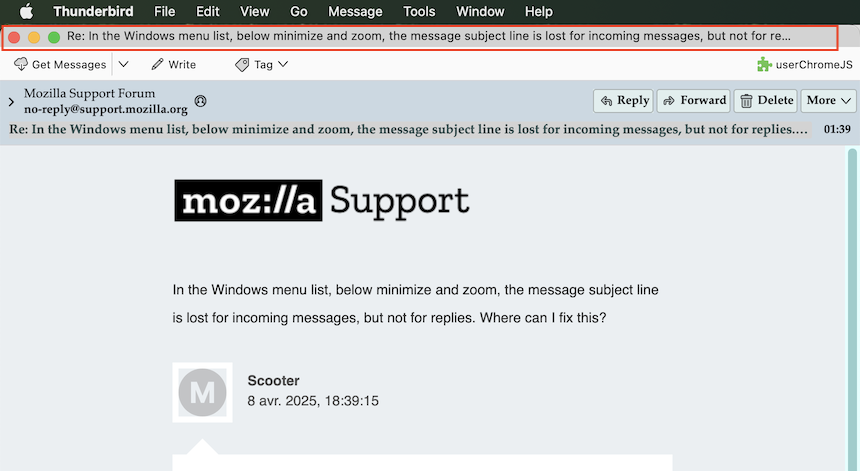
Thanks Mapenzi and Scooter!
You are quite right.
I've used Thunderbird since abandoning Outlook in... maybe 2000? :-D
Always have opened current interesting/actionable messages in new windows, and switched based on "windows" list entry being message title. Especially when pasting back and forth between several. Now I'm in the ridiculous situation of opening the same messages over and over. The list of useless "Mozilla Thunderbird" entries just grows...
I'll now have the pleasure of opening a bug report for the first time in 25 years. :-)
Did you try to open messages in new tabs? At least you could see the beginning of each subject in every tab in the tab bar and thus switch between opened messages....

Opening messages in tabs does display the message title in the tab and also in the Window list menu. So, Thunderbird knows about the message title and knows to put it in the Window menu list but it doesn't know to do that when a message is opened in a new window. In some ways this seems even more odd when you think that the title of a new window should appear in a Window list.