


Windows 10 reached EOS (end of support) on October 14, 2025. For more information, see this article.

Search Support

Avoid support scams. We will never ask you to call or text a phone number or share personal information. Please report suspicious activity using the “Report Abuse” option.

Learn More

Critical: Missing "Pop-ups and Redirects" Option in Firefox Android Site Settings for All Sites

  • No replies
  • 1 has this problem
  • 15 views
more options

Hello Firefox Support Team, I am experiencing a critical issue with the Firefox Android app where the control to manage pop-up permissions is entirely absent from the main settings menu. This makes it impossible to use any website that relies on pop-ups for critical functions (such as payment processing, SSO login, or document generation).

1. Problem Description The essential option to allow or block pop-ups is missing globally. For instance, when trying to access a government portal (https://sjmsnew.rajasthan.gov.in), a dialog appears stating the pop-up blocker is active, but there is no mechanism within the browser to disable it.

2. Current Device & App Details App: Mozilla Firefox for Android (146.0 (Build #2016129543), 13567a870654c915cd135b87cd1fe4e02fa8fa55 GV: 146.0-20251201213807 AS: 146.0.2 Latest version as of 2025-12-15) Operating System: Android (Android 14)

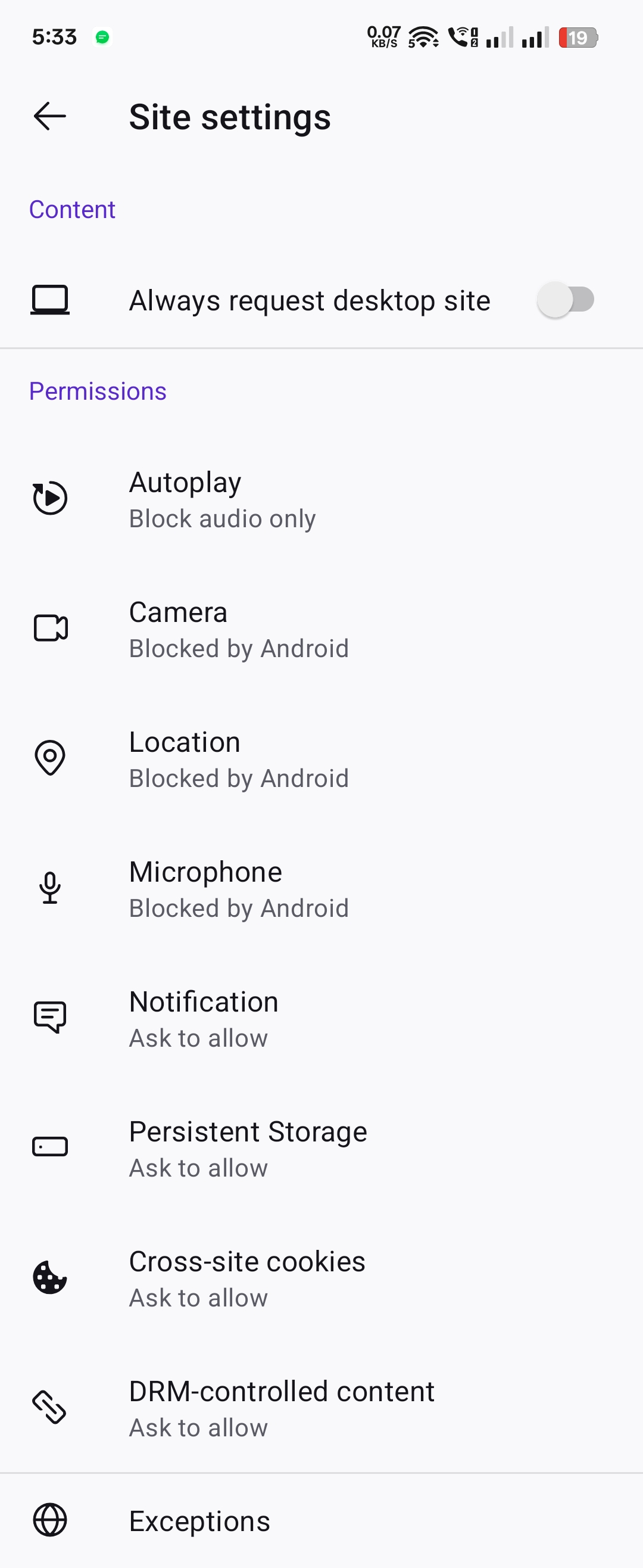
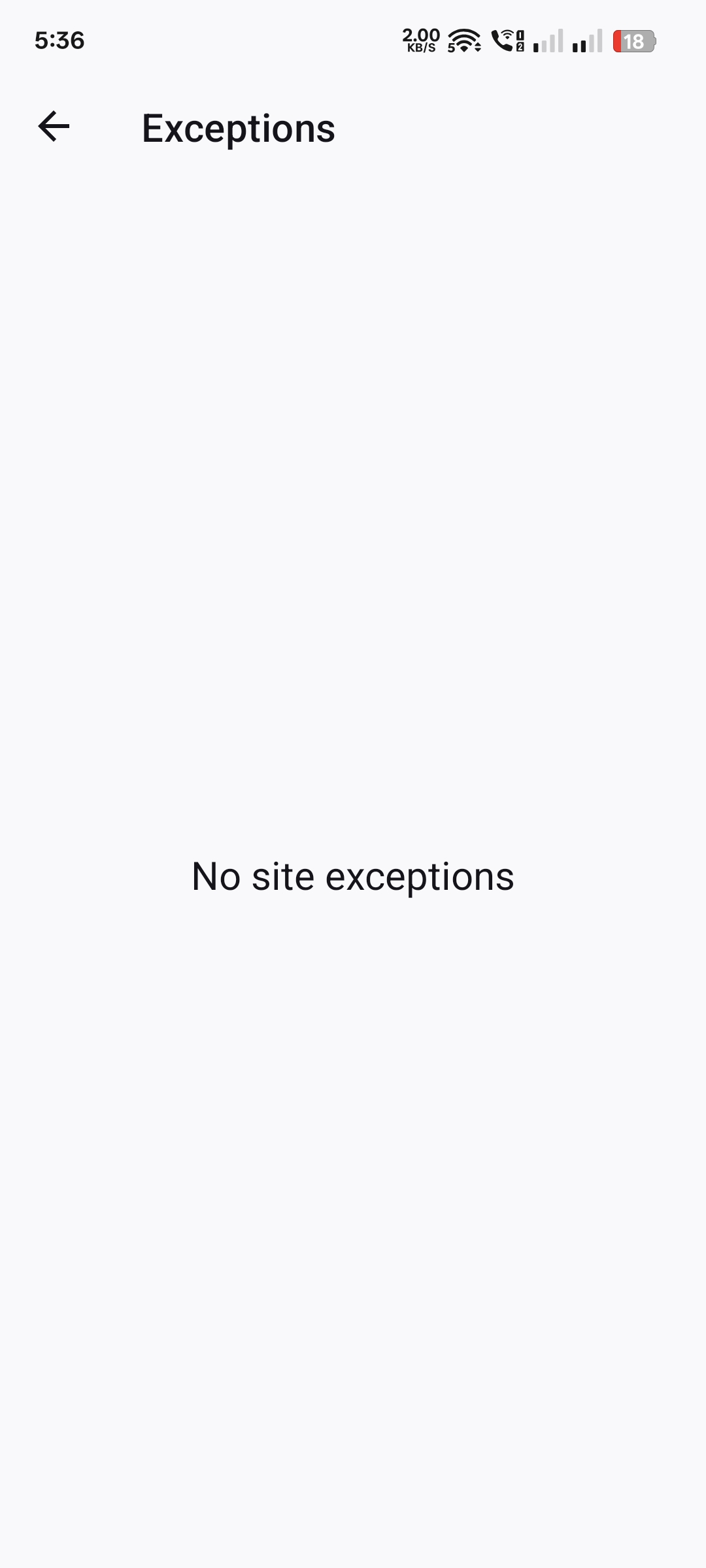
3. Technical Issue/Configuration The problem is related to the missing permissions toggle: Missing Toggle: In the main Settings \rightarrow Site settings page, the "Pop-ups and redirects" permission toggle is completely missing from the permissions list. Manual Exceptions Disabled: The "Exceptions" list is empty, and there is no visible option (like an 'Add' or '+' button) to manually add a domain to allow pop-ups. Tracking Protection Status: Enhanced Tracking Protection is currently set to the Standard setting.

4. Request This seems to be a UI bug or a configuration oversight in the current Android build, making the browser unusable for many common tasks. I urgently need guidance on either: a) How to restore the "Pop-ups and redirects" permission toggle in the Site Settings. b) An alternative configuration setting (e.g., using about:config) to allow pop-ups globally until a fix is released. Thank you for your prompt assistance.
Hello Firefox Support Team, I am experiencing a critical issue with the Firefox Android app where the control to manage pop-up permissions is entirely absent from the main settings menu. This makes it impossible to use any website that relies on pop-ups for critical functions (such as payment processing, SSO login, or document generation). 1. Problem Description The essential option to allow or block pop-ups is missing globally. For instance, when trying to access a government portal (https://sjmsnew.rajasthan.gov.in), a dialog appears stating the pop-up blocker is active, but there is no mechanism within the browser to disable it. 2. Current Device & App Details App: Mozilla Firefox for Android (146.0 (Build #2016129543), 13567a870654c915cd135b87cd1fe4e02fa8fa55 GV: 146.0-20251201213807 AS: 146.0.2 Latest version as of 2025-12-15) Operating System: Android (Android 14) 3. Technical Issue/Configuration The problem is related to the missing permissions toggle: Missing Toggle: In the main Settings \rightarrow Site settings page, the "Pop-ups and redirects" permission toggle is completely missing from the permissions list. Manual Exceptions Disabled: The "Exceptions" list is empty, and there is no visible option (like an 'Add' or '+' button) to manually add a domain to allow pop-ups. Tracking Protection Status: Enhanced Tracking Protection is currently set to the Standard setting. 4. Request This seems to be a UI bug or a configuration oversight in the current Android build, making the browser unusable for many common tasks. I urgently need guidance on either: a) How to restore the "Pop-ups and redirects" permission toggle in the Site Settings. b) An alternative configuration setting (e.g., using about:config) to allow pop-ups globally until a fix is released. Thank you for your prompt assistance.
Attached screenshots

You must log in to your account to reply to posts. Please start a new question, if you do not have an account yet.